Troubleshooting
Fix a communication assigned to the wrong contact
If SureBook assigns a communication to the wrong contact, open the communication and use Reassign Communication to choose the correct contact. You can also create a contact during reassignment if the person isn't in SureBook yet.
Reassign the communication
Open Communications.
Select the communication assigned to the wrong contact.
Click the three-dot menu beside Details.
Select Reassign Communication.
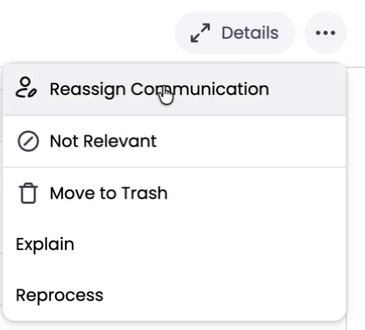
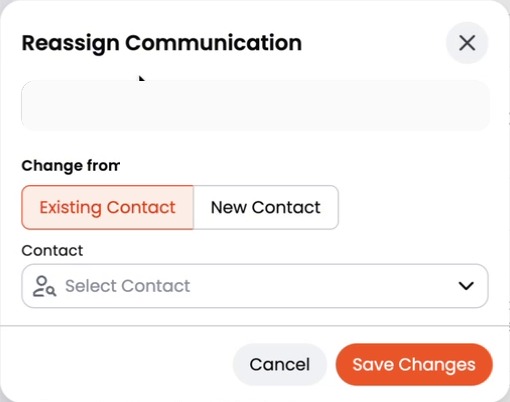
Select Existing Contact.
Click Select Contact.
Type the correct contact's name.
Select the contact.
Click Save Changes.
SureBook reprocesses the communication using the correct contact's context. This can take a couple of minutes.
Create a contact during reassignment
If the correct person isn't in SureBook yet:
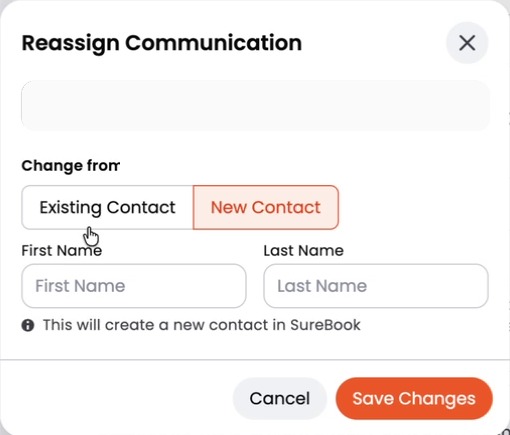
- Select New Contact in the Reassign Communication window.
- Enter the contact's First Name and Last Name.
- Click Save Changes.
SureBook creates the contact and reprocesses the communication using the new contact's context.
If the change doesn't appear right away
Wait a couple of minutes for SureBook to finish reprocessing the communication. Then open the communication again and check the contact name.
Still stuck?
Ask us a question and include the communication and the contact it should be assigned to. We'll get back to you — your question also helps us improve this guide.