Daily work
How SureBook sorts relevant and not relevant communications
SureBook places communications tied to your business, clients, prospects, or opportunities in Incoming. Promotional, personal, and other unrelated messages go to Not Relevant. You can move a communication if SureBook sorts it incorrectly.
How relevance sorting works
SureBook checks communications from email, voicemail, phone, and other connected sources. Communications that may need your attention appear in Incoming for processing.
Messages that don't appear related to your business go to Not Relevant. They remain available for you to review.
Communications from known contacts
When someone is already in your contacts, SureBook sends that person's communications to Incoming.
Move a communication to Incoming
Use this when a business or client communication appears in Not Relevant.
- Open Communications.
- Select Not Relevant.
- Find the communication you want to move.
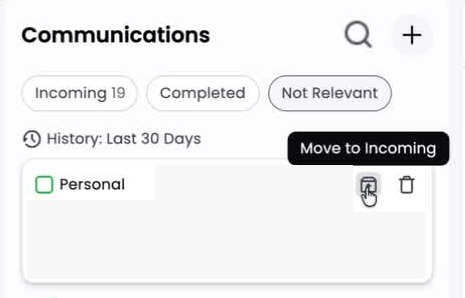
- Click the box-with-up-arrow icon labeled Move to Incoming.
- Open a communication first and click Move to Incoming if you want to review the message before moving it.
SureBook sends the communication back for processing and treats it as relevant.
To move several communications at once:
- Select the checkbox beside each communication.
- Click Move to Incoming in the action bar.
Mark a communication as Not Relevant
Use this when a message in Incoming doesn't relate to your business.
- Open Communications.
- Select Incoming.
- Find the communication you want to move.
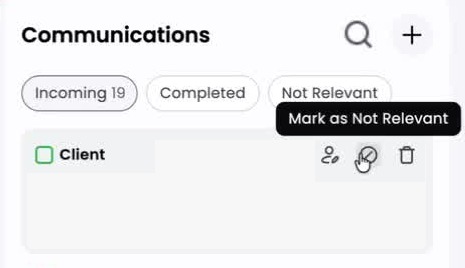
- Click the circle-with-slash icon labeled Mark as Not Relevant.
The communication moves out of Incoming and remains available under Not Relevant.
To move several communications at once:
- Select the checkbox beside each communication.
- Click Not Relevant in the action bar.
Common questions
What happens after I move a communication to Incoming?
SureBook processes it again as a relevant communication and handles it accordingly.
Can I correct several communications at the same time?
Yes. Select the checkboxes beside the communications, then use Move to Incoming or Not Relevant in the action bar.
Will moving a message to Not Relevant delete it?
No. The communication remains available under Not Relevant.
Still stuck?
Ask us a question and we'll get back to you — your question also helps us improve this guide.